
Product Updates
New Feature: In-App Tours – "How To" Guides
We’ve introduced Tours, a new in-app learning feature that shows you how to use the StratSimple software. You can now access guided walkthroughs right from the page you’re working on.
Description
Tours are interactive, on-screen walkthroughs that highlight exactly what you need to click and where, so you can learn new features without leaving your current page.
How to Use Tours: Step-by-Step
- Find the Tours icon. Look for the graduate cap icon in the top right corner, next to your profile picture or initials.

- Open the Tours menu. Click the icon to see Tours available for the page you’re currently on, or choose to browse all Tours across the platform.
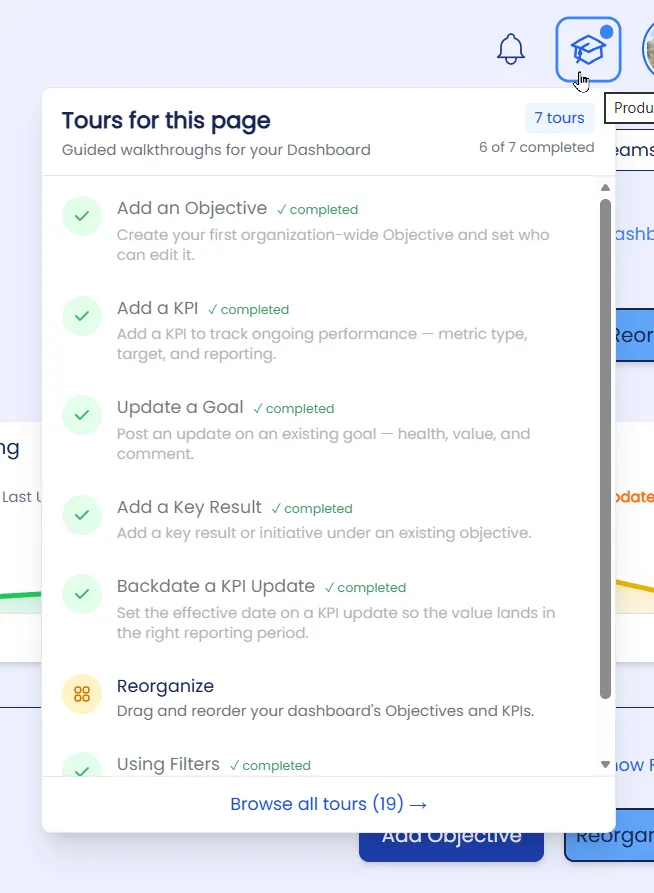
- Select a Tour. Browse by page to find the walkthrough you need — for example, on the Dashboard, you might select the “Add an Objective” Tour.
- Follow along. The screen will dim and highlight the specific elements you need to interact with, guiding you step-by-step through the process. Click Next or Previous to move through the tour.
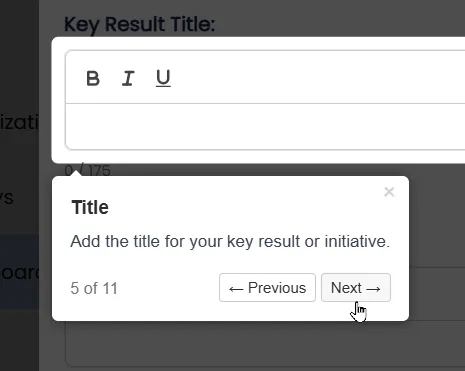
- Exit anytime. You can leave the Tour at any point by clicking in the grey area, and answering “OK” in the message box. The page stays active, so you can continue working after you exit the tour.
Closing Statement
We hope Tours make it easier than ever to get the most out of the software. If there’s a Tour you’d like to see that we don’t currently offer, let us know at support@stratsimple.com. We’d love to hear from you!