
Product Updates
Link annual goals to long-term strategic pillars
What’s new
You can now assign one or more strategic pillars to your annual goals. Those pillar connections show directly on the dashboard, so anyone viewing the plan can instantly understand the “why” behind the work.
Why this matters
Most organizations don’t operate in neat boxes. One goal can often support multiple priorities, like financial sustainability and operational excellence.
With objective-to-pillar linking, you can:
-
Show alignment without extra spreadsheets
-
Tell a clearer story to leadership and boards by showing how your annual objective links back to long-term strategy
How to use it
-
Add Strategic Pillars on your Organization overview – don’t be afraid to color code them! The colors help highlight each Pillar as it’s used throughout the software.
-
Go to your Dashboard area for the correct timeframe.
-
Open or create a top level goal (E.g. Objective, Strategy..etc)
-
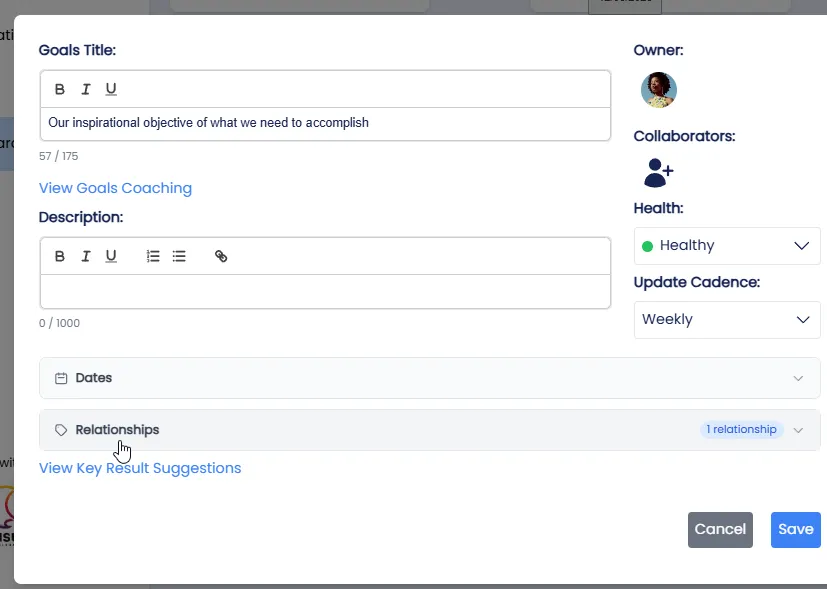
Edit that top level goal, and under Relationships, select one or more strategic pillar tags.
-
Back on the Dashboard, you can use the display options to filter your dashboard to only those goals that support a chosen pillar.
Pro tip
Start with your top 3–5 goals for the year and link them to the pillars they support. You’ll immediately see where your plan is concentrated, and where a pillar may need more focus.
Closing
This update is designed to make your strategic plan easier to understand, easier to manage, and easier to communicate. If you want help setting up your long-term pillars and annual goals for maximum clarity, reach out to our team.